We make a Shopify theme for skincare brands, so this is not a ranked list of the best ones. We have not tested other studios’ themes closely enough to rank them fairly, and we would not be a neutral judge.
What we can share is the checklist we design against. Every item is something you can check yourself, in a few minutes, on any theme’s demo store. Run it against ours too.
Start with the questions your customer asks
A shopper deciding on a serum is trying to answer five things:
- What is in it?
- Is it right for my skin?
- How and when do I use it?
- What do I use it with?
- Why should I believe what you say it does?
Theme demos tend to lead with the home page, but these questions get answered on the product page. So before comparing designs, open a product page on the demo store, on your phone, and see how many of the five you can answer without leaving it. That one test tells you more than any feature list.
1. Ingredients
Look for three things. A complete ingredient list on the product page, as text. A short explanation of the ingredients that matter, in plain language. And some way to write an ingredient up once and reuse it, because typing the same paragraph about niacinamide into twelve product pages is how descriptions drift apart.
Ask where that content lives. If the demo’s ingredient section is a text box on the product template, every product using that template will show the same ingredients until you build something more.
We wrote a separate guide on this: how to present ingredients on a skincare store.
2. Suitability and claims
A good product page says who the product is for and who it is not for: skin types, when to use it, what to avoid using it with, and any precautions. Check two things in the demo.
First, whether these facts change from product to product. Text typed into a template appears on every product that uses it. A profile row reading “Dry, normal, combination” then shows up on your cleanser, your SPF and your gift card alike, and some of those statements will be false.
Second, whether there is a clear place for warnings and directions that does not require opening five panels.
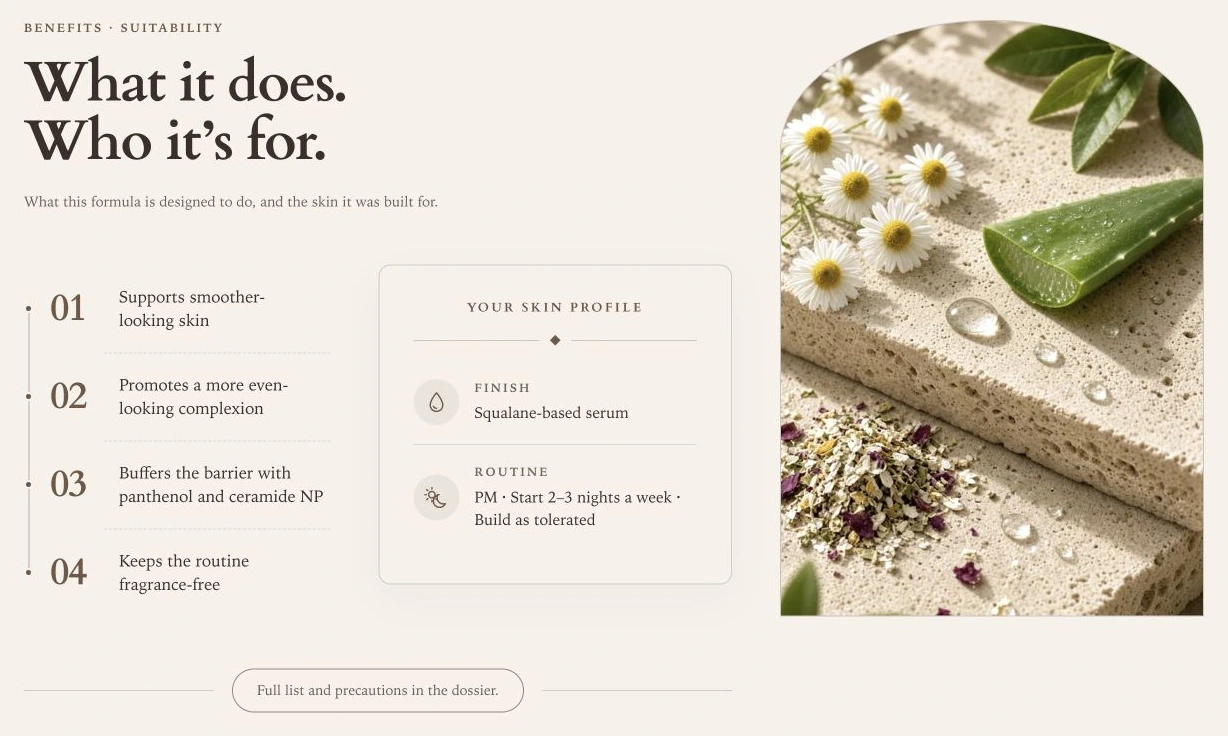
A theme cannot make a claim true or permitted. Rules on cosmetic claims exist and differ by country, and they are yours to check. What a theme can do is stop forcing one sentence onto every product.
3. Test results and proof
If you have test results, certificates or sourcing documents, look at where the theme puts them. A row of badges is decoration. What you want is room for the substance: what was tested, when, by what method, and a link to the document.
Then check what happens on a product that has no documents. The section should disappear. A proof section left showing placeholder text, or showing one product’s study under another product, does more damage than having no section.
More on this in how to show test results on a product page.
4. Routines and order of use
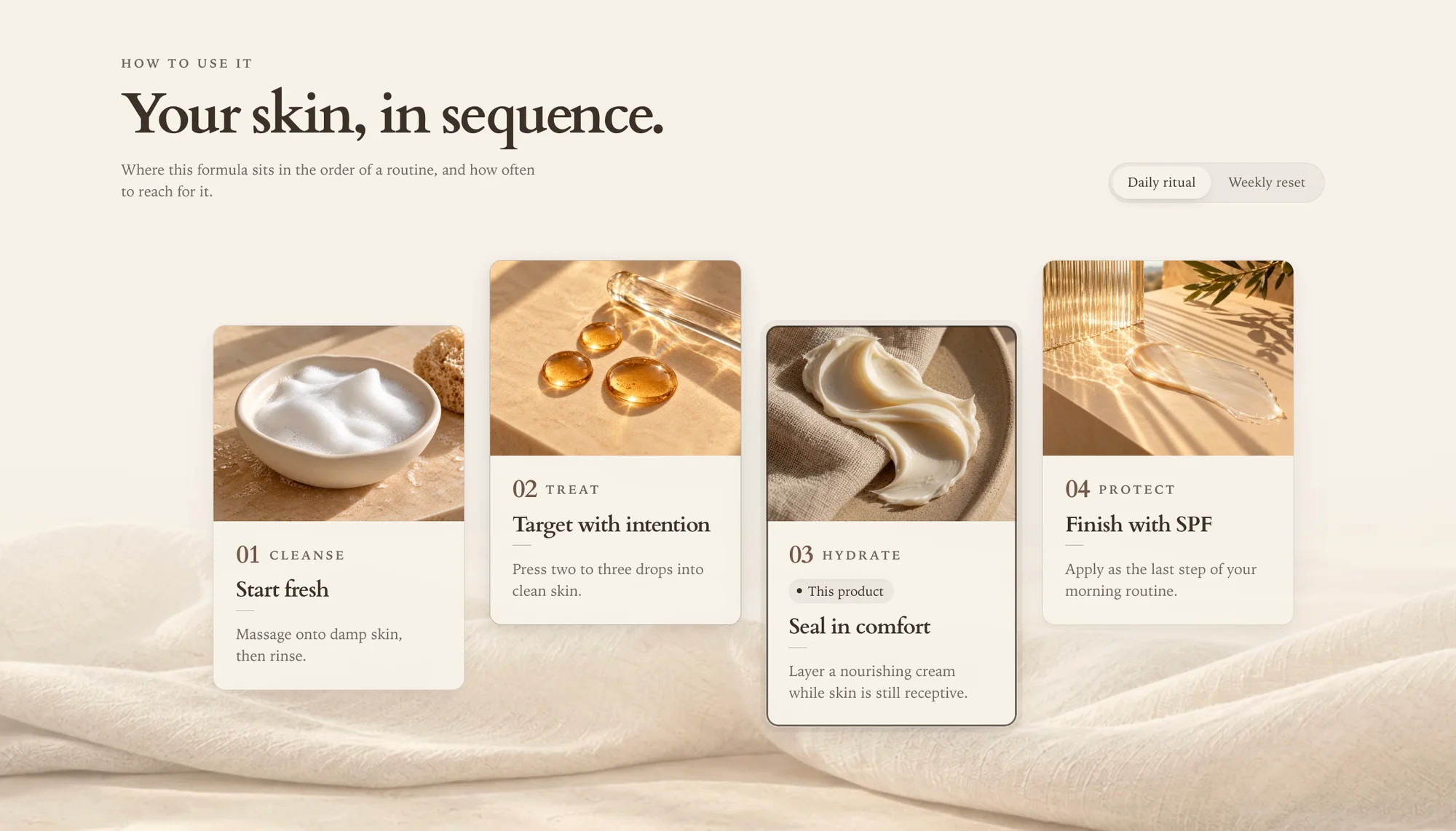
Skincare is used in sequence, and shoppers want to know where a product sits: morning or evening, before or after moisturizer, daily or weekly. Look for a section that shows the order of use rather than a paragraph that describes it, and for a way to buy the products that go together without visiting four pages.
5. Comparison
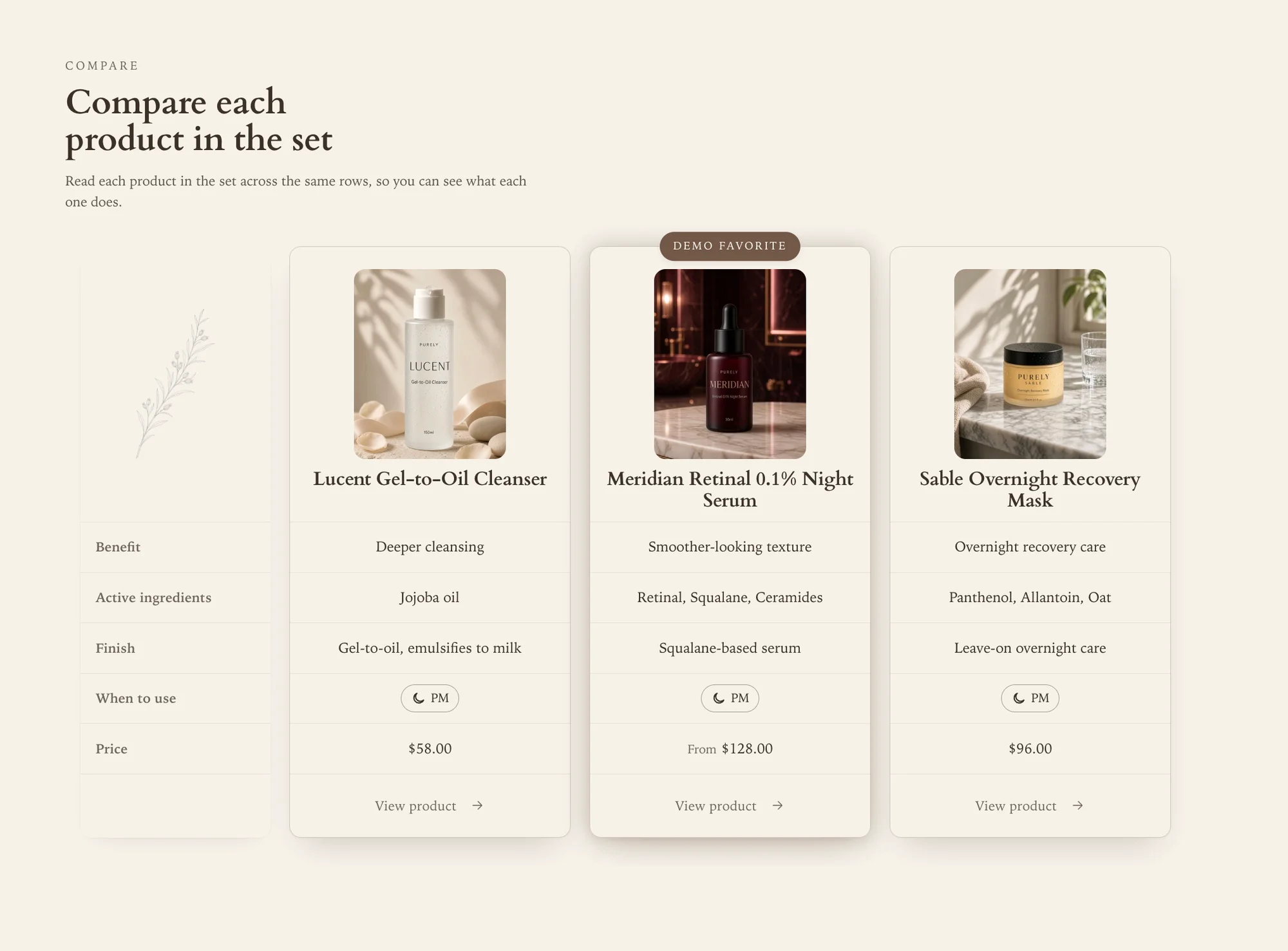
Once you sell two serums, the most common question becomes “which one is for me”. Price alone does not answer it. Look for a comparison that uses rows you define, such as key ingredients, texture, strength and when to use, and check that it reads the values from each product instead of asking you to retype them.
Open it on a phone as well. A wide table that makes the whole page scroll sideways is hard to use. Nielsen Norman Group’s guidance on comparison tables is a good short read on keeping them scannable.
6. Speed
Do not take a theme’s speed claims on trust, including ours. Test the demo yourself:
- Open PageSpeed Insights and test a product page, not only the home page. Product pages carry the most content.
- Read the mobile result. It is the stricter test.
- Run it three times. Scores move between runs, so a single number means little.
- Look at the Core Web Vitals as well as the score. They describe how quickly the main content appears, how soon the page responds, and whether things jump around while it loads.
Remember that the demo is not your store. Apps usually add their own scripts, so a theme that needs five apps to do what the demo shows may not perform like the demo. That leads to the last point on this list.
7. Accessibility
Some of your customers navigate with a keyboard, a screen reader or a zoomed-in screen. You can do a first check in five minutes:
- Put the mouse away and press Tab through the demo’s product page. You should always be able to see where you are, and reach the menu, the filters, the variant picker and the buy button.
- Try any slider, carousel or before-and-after comparison with the arrow keys.
- Look for a pause button on anything that moves by itself.
- Zoom the browser to 200% and check that nothing is cut off.
The W3C’s easy checks go further, and its overview of WCAG explains the standard most themes refer to. Be wary of “fully accessible” as a claim. An automated score of 100 does not show that a site meets WCAG. In the W3C’s words, no tool alone can determine that, and human evaluation is required.
8. What needs an app, and what needs a developer
Ask the theme’s maker which parts of the demo come from the theme and which come from apps. Reviews and subscriptions always need an app on Shopify. Ingredient sections, comparisons, routine bundles and before-and-after sliders are often apps too, each with a monthly fee and its own scripts.
Then ask how the content is edited. Can you fill in ingredients and test results from the theme editor and the product page in Shopify admin, or does it take a developer and a custom data setup? Is the documentation written for a store owner?
How Milestone answers these
Milestone is the theme we make, and it was designed against this list. The parts above map to sections in the theme: Ingredient atlas, Benefits and suitability, Proof ledger, Protocol timeline and Formula comparison. Reviews and subscriptions still need apps, and the theme has places for them.
On speed and accessibility we would rather show the work than quote a number. Our test results page has the Lighthouse reports for the demo store, including the range between runs, and says plainly what has and has not been verified. WCAG 2.1 AA is a target we publish our progress against, not a badge.
The checklist
Take this to any demo store:
- Can I answer the five customer questions from one product page, on a phone?
- Is the full ingredient list on the page as text, and can key ingredients be written once and reused?
- Do suitability details and warnings change per product?
- Is there room for real evidence, and does the section hide when a product has none?
- Does the page show where the product sits in a routine?
- Can shoppers compare products on rows I choose?
- What does PageSpeed Insights say about a product page on mobile, over three runs?
- Can I use the product page with only a keyboard?
- Which demo features are apps, and what do they cost each month?
Ask a question about this article
There is no comment thread here. Send your question and a person will reply by email.